passport888/lanhound
Zero-config home LAN watchdog: discovers every device, alerts on Telegram when a stranger joins.
3.2K
passport888/lanhound repository overview

LanHound
A zero-config watchdog for your home LAN.
Finds every device on your network, remembers when each one was online,
and barks on Telegram the moment a stranger joins.
English · 简体中文
Quick start
docker run -d --name lanhound --restart unless-stopped \
  --network host --cap-add=NET_RAW \
  -v lanhound-data:/data \
  passport888/lanhound
Open http://<host>:8686. That's it: no config file, no account, no
setup wizard. LanHound finds every private subnet the host has an
interface on and starts watching.
Or with Compose — see docker-compose.yml:
docker compose up -d
What it does
-
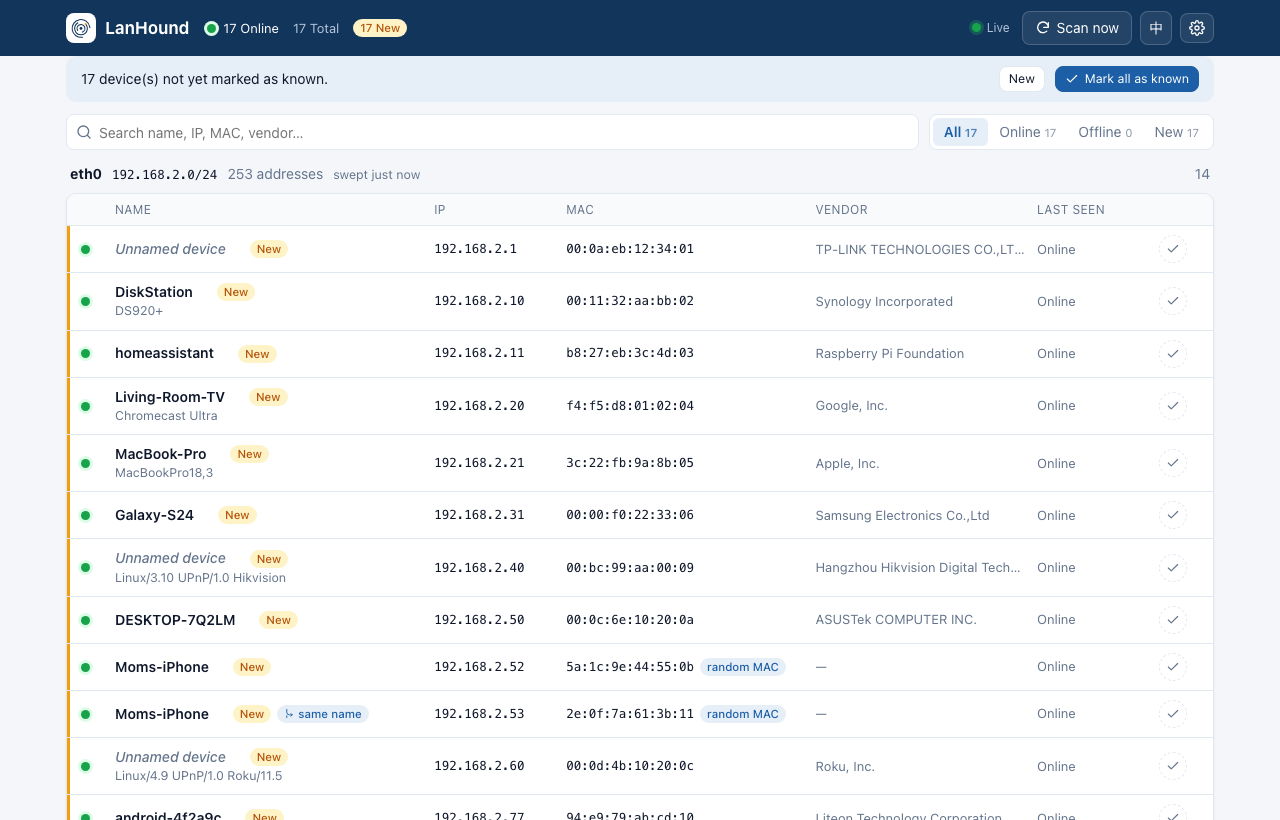
Discovers everything on the segment. A polite ARP sweep every 5 minutes, plus continuous passive listening to DHCP, mDNS, SSDP and NetBIOS chatter. A phone joining the Wi-Fi is usually seen within a second or two, long before the next sweep. IPv6 too: one echo to
ff02::1per sweep plus neighbour-discovery listening record each device's link-local and global addresses. -
Names devices for you. Hostnames from DHCP, mDNS, NetBIOS and your router's DNS; vendors from the embedded IEEE OUI registry (40k+ entries); product hints like Chromecast Ultra or DS920+ from mDNS and UPnP.
-
Alerts on new devices via Telegram and/or any webhook. Each alert says what you need to tell friend from foe: name, vendor, IP, MAC, first-seen time. The first scan after install is a silent baseline, so you won't get 30 messages in your first minute.
-
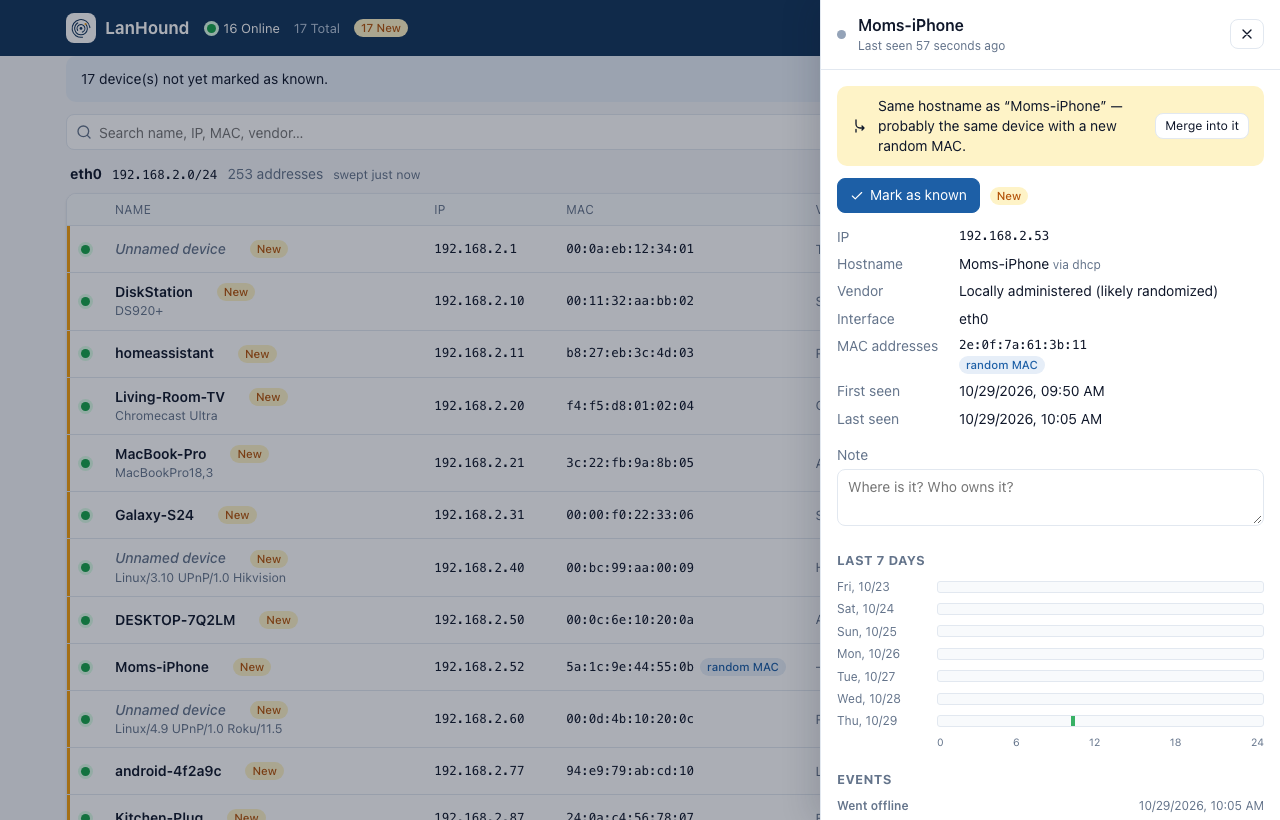
Copes with randomized MACs. Phones rotate their MAC per network. LanHound fingerprints each device (hostname, mDNS model, DHCP option 55/60 fingerprint) and, when a "new" MAC matches a device you already know, says "probably X with a new random MAC" and offers a one-click merge. Generic names like "iPhone" count only as weak evidence, and two MACs online at the same time are never matched. A confident match with a device you marked as known does not alert at all; it is only noted in the alert log. The merged device keeps every MAC and its full history.
-
Keeps history. Online/offline sessions and events (IP changes, hostname changes) per device, a 7-day presence timeline, a "usual hours" heat map per device and a network activity heat map (devices online per hour), kept for 90 days in a single SQLite file.
-
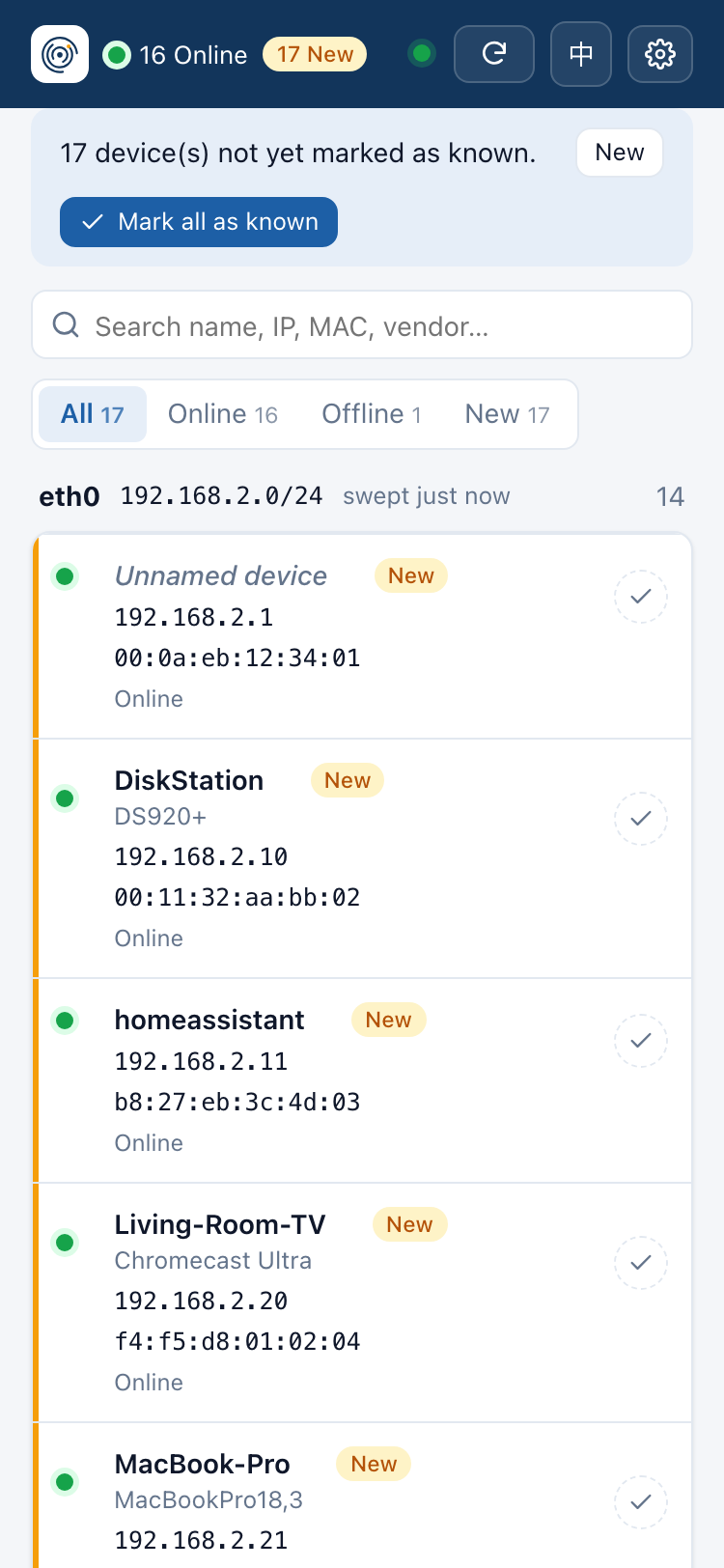
A live, friendly web UI. Updates stream in real time. Search and filter, rename inline, mark devices as known, add notes. It works on a phone, in English and 中文.
-
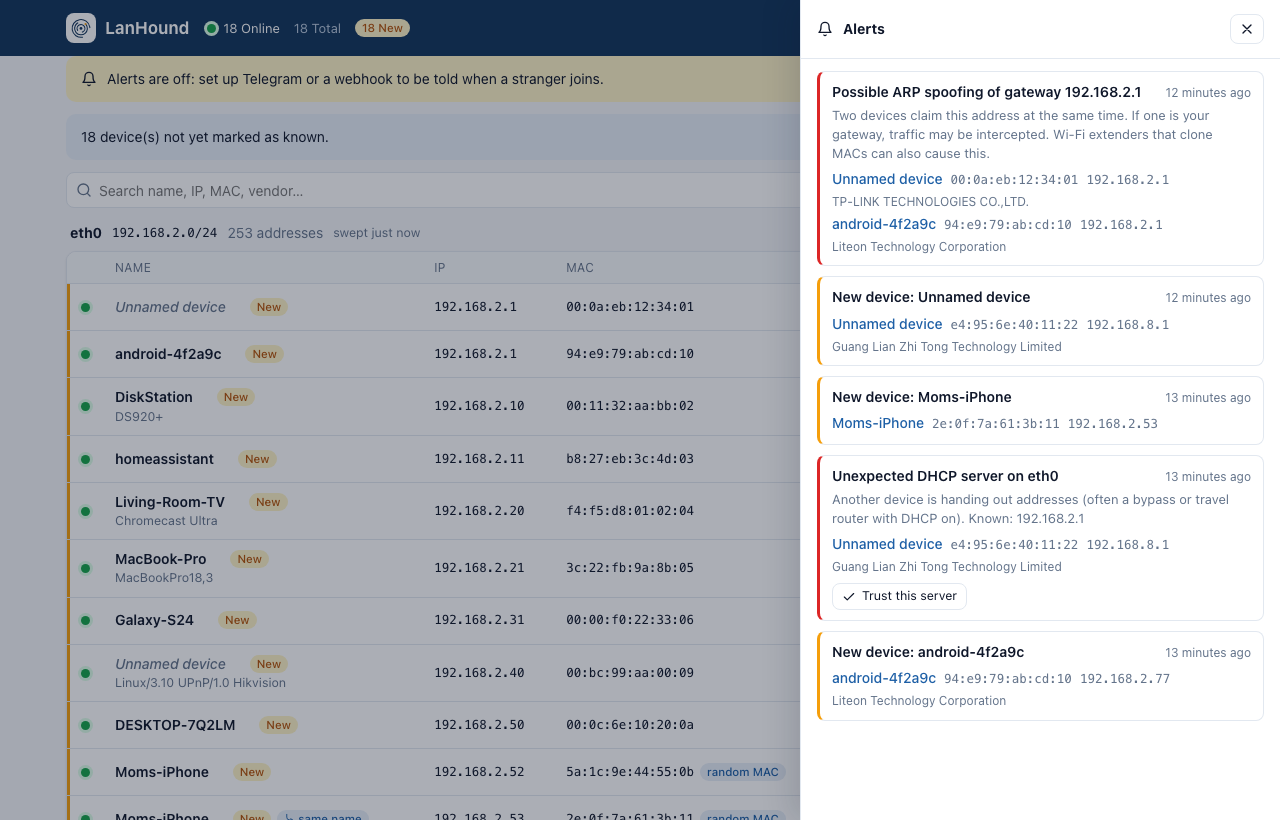
Security alerts (detect and report only):
- ARP spoofing / IP conflicts: two MACs claiming one IP at the same time. This is flagged as critical when the IP is your gateway.
- ARP floods: a burst of unsolicited ARP from one device.
- Gateway MAC change: the default route's router suddenly answers from a different MAC.
- Rogue DHCP servers: a second device handing out addresses, very often a bypass router with DHCP left on.
- Critical devices: mark your NAS or camera as critical and get told when it goes offline and when it comes back.
Every alert lands in the in-app alert log (🔔), notifications or not.
-
Multi-interface. Wired + Wi-Fi or dual-NIC hosts get one watcher per broadcast domain, and devices are grouped by interface. Interfaces that come and go are followed automatically.
Alerts
Open Settings (⚙) in the web UI, paste a Telegram bot token (from @BotFather) and your chat ID, and press Send test. A webhook receives a JSON POST:
{
  "event": "new_device",
  "devices": [{ "id": 17, "hostname": "android-4f2a9c", "vendor": "Liteon Technology Corporation",
                "ip": "192.168.2.77", "mac": "94:e9:79:ab:cd:10", "interface": "eth0",
                "firstSeen": "2026-10-29T09:50:18+08:00", "randomized": false }],
  "text": "🐕 New device on your network …",
  "content": "🐕 New device on your network …"
}
text/content carry the rendered message, so Slack- and Discord-style
incoming webhooks work as-is. If api.telegram.org is unreachable from
your network, set a Bot API proxy URL in Settings, or set HTTPS_PROXY.
What the security checks can and can't see
On a switched network a host only receives broadcasts and traffic sent
to it. LanHound catches ARP spoofing when the attacker poisons the whole
segment (the default mode of common tools) or poisons the LanHound host.
Spoofing aimed only at two other machines is invisible to any passive
observer; the gateway-MAC and DHCP checks work regardless. To find DHCP
servers LanHound broadcasts a DHCPDISCOVER every 30 minutes and never
follows up with a request, so no lease is taken. Set
LANHOUND_DHCP_PROBE=off to disable it. The first DHCP server seen is
trusted; trust others from the alert with one click.
Router & modem device tables (optional)
ARP only reaches LanHound's own broadcast domain. To also list devices behind your router (another subnet, a guest network, the ISP modem side of a double NAT) and get DHCP names straight from the lease table, add a source under Settings → Routers:
- OpenWrt (and derivatives such as ImmortalWrt, iStoreOS, Kwrt):
enter the LuCI address and the router account. LanHound calls two
read-only methods (
luci-rpc getDHCPLeases/getHostHints) every 2 minutes. - URL: anything that serves a dnsmasq lease file,
/proc/net/arp,ip neigh/arp -aoutput or a CSV (mac,ip,name). Use this for other routers and modems, for example a cron job that copies the modem's device list somewhere LanHound can fetch it.
Devices on LanHound's own network keep ARP-based presence and only take names from the router, because router tables hold stale entries. Devices only the router knows are listed in their own section. The first sync of a source is silent, like the first sweep. Passwords are stored in the local database.
Service detection (optional, off by default)
Turn it on under Settings → Discovery and LanHound identifies what each device runs. Once a day per device, plus right away for new ones, it opens a TCP connection to about 20 common ports (SSH, web, SMB, AFP, RTSP, IPP/9100, RDP/VNC, AirPlay, Cast, Plex, Home Assistant…), one device at a time, and reads web page titles and SSH banners. From that it guesses the device type (NAS, camera, printer, router, computer, phone, media player, server, smart home). Web UIs become clickable links in the device panel. Telnet is flagged as risky: it is still common on cheap cameras and ISP modems.
This is a (gentle) port scan, which is why it is opt-in. Only enable it
on networks you own. lanhound probe <ip> runs the same probe once from
the command line, and the device panel has a "Probe now" button.
Remote probes (VLANs, guest networks)
LanHound sees one broadcast domain per interface. For segments it can't reach (a VLAN, the guest Wi-Fi, a lab network), add a probe under Settings → Discovery → Remote probes. LanHound shows a token once, together with the command to run on any Linux host in that segment:
docker run -d --name lanhound-agent --restart unless-stopped --network host --cap-add=NET_RAW \
  passport888/lanhound agent --server http://<central>:8686 --token lhp_…
The agent scans and listens exactly like LanHound does, keeps no database, and uploads every 2 seconds. It buffers while the central instance is unreachable. Its devices get their own section and the full treatment: history, alerts, the security checks with that segment's gateway, and fingerprinting. A probe's first sweep is a silent baseline. If a probe goes quiet it is shown offline, and its devices are not all marked offline (no false "critical device offline" storm). Removing a probe revokes its token.
Home Assistant
Under Settings → Home Assistant, point LanHound at the MQTT broker
your Home Assistant uses (or set LANHOUND_MQTT_URL=mqtt://user:pass@host:1883).
Through MQTT discovery it creates:
- a device tracker (home / not_home) per device, keyed by LanHound's device ID, so a phone whose random MACs you merged stays one entity. Known devices only by default; switch to all devices if you like. MAC connections let HA link them to devices from other integrations.
- sensors for devices online and unreviewed devices.
- an event entity (
event.lanhound_alert) that fires on every LanHound alert (new_device,arp_conflict,rogue_dhcp,device_offline, …) with the rendered message and the devices involved, ready for automations.
Configuration
None required. For the few who want to override something, everything is an environment variable. Variables that are set win over the web UI, and the UI shows them as locked.
| Variable | Default | Meaning |
|---|---|---|
LANHOUND_LISTEN | :8686 | Web UI address |
LANHOUND_DATA | /data (Docker), ./data | Where lanhound.db lives |
LANHOUND_SCAN_INTERVAL | 5m | Time between ARP sweeps (min 30s) |
LANHOUND_INTERFACES | all | Comma-separated interfaces to watch |
LANHOUND_SCAN_RATE | 300 | Max ARP requests per second per interface |
LANHOUND_RETENTION_DAYS | 90 | History retention |
LANHOUND_DHCP_PROBE | 30m | DHCP server probe interval, or off |
LANHOUND_MQTT_URL | — | Home Assistant MQTT broker (overrides the UI) |
LANHOUND_PASSWORD | — | Protect the UI with HTTP basic auth (any username) |
LANHOUND_LANG | en | Alert language: en or zh |
TELEGRAM_BOT_TOKEN, TELEGRAM_CHAT_ID | — | Telegram alerts |
TELEGRAM_API_URL | https://api.telegram.org | Bot API proxy |
LANHOUND_WEBHOOK_URL | — | Webhook alerts |
TZ | UTC | Time zone for alert timestamps |
A device counts as offline once it has been silent for two sweeps plus a minute (about 11 minutes by default).
Networks it understands
| Topology | Support |
|---|---|
| Flat home LAN (single subnet) | ✅ |
| Bypass router / 旁路由 (same subnet) | ✅ nothing to configure: discovery reads each interface's own address/mask, not the default route |
| Multi-homed host (wired + Wi-Fi, dual NIC) | ✅ one watcher per interface |
| Docker / VM host | ✅ container and VM bridges (docker0, br-<id>, virbr0…) are skipped automatically; name one in LANHOUND_INTERFACES to watch it anyway |
| ISP modem + router double NAT (modem on 192.168.1.0/24) | ✅ via a router/modem device-table source (ARP can't cross a router) |
| VLANs / guest networks / AP isolation | ✅ a remote probe (lanhound agent) per segment reports to one dashboard |
Only run LanHound on networks you own or are authorized to monitor.
Design principles
- Zero configuration. Interfaces, subnets and gateways are detected, never configured.
- Sentinel, not soldier. LanHound sends only ordinary ARP requests from the host's own IP/MAC (plus a reverse-DNS lookup and a NetBIOS name query for devices that never said their name, a DHCPDISCOVER every 30 minutes to spot rogue DHCP servers, and — only if you turn service detection on — TCP connects to common ports) and otherwise listens. No ARP spoofing, no gratuitous ARP, no deauth, no "kicking" devices. Enforcement belongs to your router.
- Small. One static binary (pure Go, no cgo) with the UI embedded.
About 13 MB on disk, and around 10 MB of RAM watching a small network.
Needs only
CAP_NET_RAW, not root or--privileged. - Your data stays home. No cloud, no telemetry, no account. One SQLite file you can back up or move.
Without Docker
Download a binary from Releases
(linux amd64 / arm64 / armv7 / 386) and run it as a hardened systemd
service. It runs as an unprivileged dynamic user with only CAP_NET_RAW,
and the data lives in /var/lib/lanhound:
sudo install -m 755 lanhound_<version>_linux_amd64 /usr/local/bin/lanhound
sudo curl -fsSLo /etc/systemd/system/lanhound.service \
  https://raw.githubusercontent.com/playwjj/lanhound/main/contrib/lanhound.service
sudo systemctl daemon-reload && sudo systemctl enable --now lanhound
sudo systemctl edit lanhound    # optional: [Service] Environment=TZ=Asia/Shanghai …
This is also the way to go when the host can't pull container images. The binary has no dependencies, so copying one file is enough.
To run it by hand or build from source:
make build                              # needs Go 1.26+
sudo setcap cap_net_raw+ep ./lanhound   # the only privilege it needs
./lanhound                              # web UI on :8686, data in ./data
./lanhound scan                         # one-shot scan, print a table (-json for JSON)
./lanhound -demo                        # simulated network: try the UI on any OS
Discovery uses Linux raw sockets. On macOS or Windows, use Docker on a
Linux host, or -demo to explore the UI.
Hacking on the UI
The Vue 3 front end lives in web/ and builds into internal/web/dist,
which is embedded into the binary (and committed, so go build works
without Node):
./lanhound -demo &          # API on :8686 with fake devices
cd web && npm ci && npm run dev
make web                    # rebuild the embedded dist before committing
FAQ
A device shows up twice. It is probably a phone using a randomized MAC. If both entries share a hostname, LanHound marks the newer one with same name. Open it and press Merge into it. You can also merge any two devices by hand from the device panel.
I installed it and everything is "New". Expected: LanHound can't know which devices are yours. Press Mark all as known once; from then on only genuinely new devices stand out (and alert).
Some devices on my network never appear. They are on a different broadcast domain: another VLAN, a guest network, behind a second router, or isolated by the access point. Run another instance there.
Can it block a device? No, by design. Block it on your router.
Roadmap
- v0.1: discovery engine, history, web UI, new-device alerts
- v0.2: security alerts (ARP spoofing/conflicts, ARP floods, gateway MAC change, rogue DHCP, critical devices), alert log, router/modem device tables, IPv6, heat maps, randomized-MAC fingerprinting, CSV export
- Next release (done on main): Home Assistant (MQTT discovery), service detection (opt-in), remote probes for VLANs and guest networks
License
MIT
Tag summary
Content type
Image
Digest
sha256:a438bafe7…
Size
6.3 MB
Last updated
9 days ago
docker pull passport888/lanhound